Quick Answer
To choose a liquor store POS system, prioritize age verification with role-based staff permissions, inventory tracking built for high SKU counts, fast checkout, and audit-ready tax and compliance reporting. Confirm hardware compatibility, ask for a full pricing quote, and run a live demo with your products before signing.
Your checkout counter has to do more than ring up sales. It has to check IDs, keep track of a catalog that can run into the thousands of SKUs, apply the right tax on every bottle, and still move fast when there’s a line out the door on a Friday night.
Choosing a POS system for liquor store really comes down to one thing: picking software that prioritizes age verification, deep inventory tracking, and compliance reporting, not just whatever’s popular or cheapest.
Store owners tend to get burned by two things over and over.
- One, picking a generic retail POS that wasn’t built for age-restricted inventory, which usually means fines or a shaky audit down the line.
- Two, picking a liquor-specific system without checking if it could grow with them, which means an expensive, painful switch a year or two later.
This guide walks through what actually matters, in the order it usually matters, so you’re not stuck redoing this decision.
Why Liquor Stores Need a Dedicated POS System?
A basic register or a general retail POS can ring up a sale just fine. What it usually can’t do well is handle everything that comes before and after that sale: verifying age, tracking a case of wine down to the individual bottle, applying category-specific discounts, or flagging a product that’s about to expire.
A liquor store POS system is built around those specifics. It’s not just retail software with a liquor store label on it; the good ones are designed around how alcohol retail actually operates day to day, including compliance requirements that don’t apply to a regular convenience store. This is really what separates a true liquor store point of sale system from a generic one with a few extra settings turned on.
If you try to force a generic system to work, you’ll end up bolting on spreadsheets and manual checks to cover the gaps. That works for a while. It stops working the moment you get busy, add staff, or open a second location. Some stores also sell lottery tickets alongside liquor, which adds another layer most generic systems don’t handle at all, so it’s worth checking whether your POS can track ticket sales, payouts, and settlements automatically instead of leaving that on a clipboard.
Recommended Read: Cash Register vs. POS System: What’s the Real Difference?
Key Features to Look for When Choosing a Liquor Store POS System
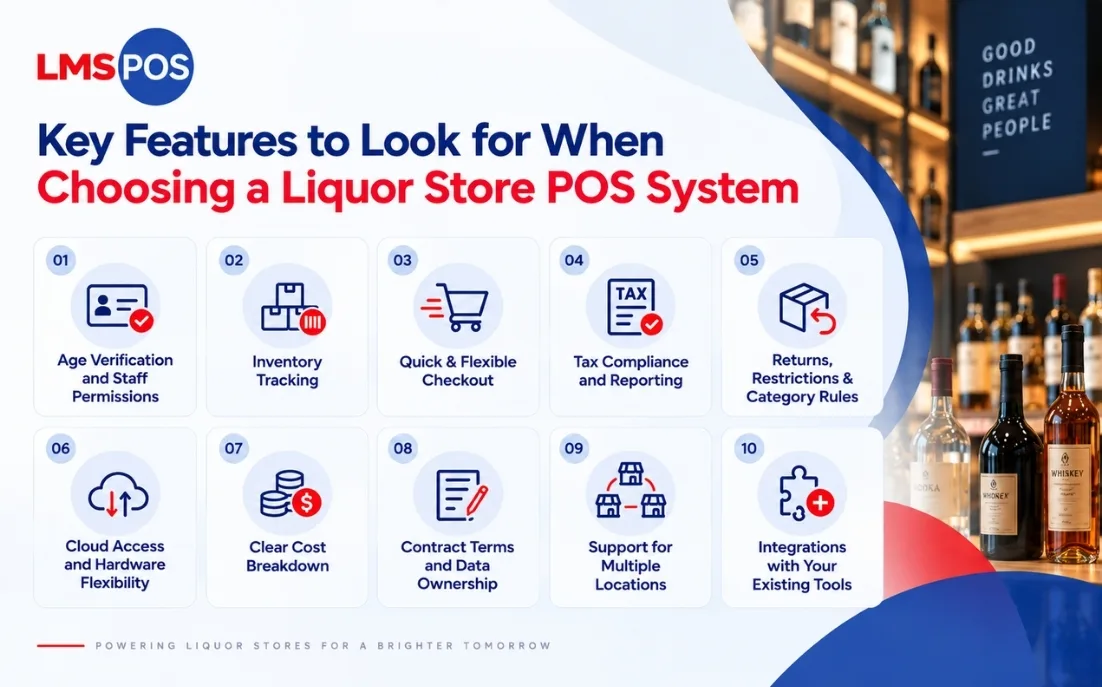
Not every POS platform is built for alcohol retail, and the gaps only show up once you’re actually running the store. Some of it comes down to essential POS features that any retailer should expect, and some of it is liquor-specific, so here’s what’s worth putting on your checklist before you commit to one.
1. Age Verification and Role-Based Staff Permissions
This is the one feature that shouldn’t be compromised on. A liquor store POS with age verification built in should prompt staff to confirm age before a sale can go through and won’t let the transaction complete until that step happens.
Beyond the basic prompt, check for:
- ID scanning that flags underage or expired IDs automatically
- Role-based permissions, so only a manager can override a blocked sale
- An audit log showing who approved what and when
This isn’t just about avoiding fines. It protects your license, and it protects your staff from being put in an awkward spot with a fake ID at 11pm on a Saturday. LMS-POS’s age verification system handles this with automated ID scanning and birthdate display at checkout, so staff never have to make a judgment call on their own.
2. Inventory Tracking for a Large Product Catalog
Even a small liquor shop can carry more individual products than a mid-sized grocery aisle. Wine alone can have dozens of vintages of the same label sitting on the shelf, which is exactly why liquor store inventory management needs to do more than a basic item count.
Your system needs to handle that volume without slowing down at checkout or during a stock count. Practical things to check for:
- Case-to-bottle breakdown, so selling a single bottle from a case updates correctly
- Batch and expiry tracking for products that need it
- Low-stock alerts that trigger before you’re out, not after
- Fast search and filtering, even with a catalog in the thousands
If your current setup involves a spreadsheet running alongside your register, this is usually the single biggest upgrade a new system can give you. This is also where a mobile inventory app earns its keep.
Being able to receive shipments, run counts, and adjust prices right from the aisle, instead of walking back to the register every time, saves real hours during a busy week.
3. Quick, Flexible Checkout at the Register
It’s easy to get caught up comparing feature lists and forget that, most of the time, your staff just wants a fast liquor store checkout system that doesn’t slow the line down during a rush.
A system that takes six taps to complete a basic transaction will slow your line down every single time, and that adds up fast on a busy night.
Look for:
- Barcode and QR scanning that actually works with the labels you use
- Multiple payment types: card, cash, mobile wallets, gift cards
- Split payments for group purchases
- A layout your staff can learn in a shift or two, not a week
It’s genuinely worth running a live demo with your own barcodes and your own product mix before signing anything. A polished sales demo with sample data can look completely different from how the system handles your actual inventory.
4. Tax Compliance and Audit-Ready Reporting
Alcohol retail comes with tax rules and licensing reports that a lot of other retail categories don’t deal with. Your system should generate the reports you need at audit time without you manually pulling numbers together.
At minimum, check that it can:
- Apply the correct alcohol tax automatically by product category
- Generate licensing and compliance reports on demand
- Keep a clean, exportable record of voids, refunds, and discounts
5. Returns, Restrictions, and Category-Specific Rules
Alcohol does not always follow the same return policy as the rest of your store. Many states restrict or ban returns on opened bottles, and your POS should let you set different return and refund rules for alcohol versus everything else you sell.
The same goes for local compliance details. Tax rates, ID-scanning requirements, and reporting formats can vary by state, so check that the system is actually built to handle your state’s specific rules, not just a generic alcohol tax setting that assumes every state works the same way.
6. Cloud Access and Hardware Flexibility
Most newer systems are cloud-based, and for good reason. It means you can check sales from your phone, your data backs up automatically, and adding a second register or location doesn’t mean starting from scratch.
That said, ask what happens during an internet outage. A good system should keep processing sales offline and sync everything once the connection’s back. If it can’t do that, you’re stuck with paper receipts the next time your Wi-Fi drops on a Saturday night.
On hardware, check whether the software is tied to specific equipment or works across what you already own, or whether it comes as a complete bundle. LMS-POS, for example, ships certified hardware like terminals, printers, scanners, cash drawers, and card readers pre-configured together, so you’re getting one quote and one point of contact instead of sourcing hardware separately.
This matters even more if you run a POS for a wine and liquor store combo, since wine adds a lot more SKUs and shelf-tracking needs than liquor alone.
7. Understanding the Full Cost Breakdown

Pricing is where a lot of stores get surprised after the fact. It usually breaks down into three parts: a monthly software fee, upfront hardware costs, and payment processing fees per transaction.
Costs vary a fair amount by provider and store size, so it’s worth getting an actual pricing quote for your setup rather than budgeting off a generic number.
One thing worth asking every vendor about is dual pricing, also called cash discounting. It lets you offset card processing fees at checkout instead of absorbing them as a straight cost, and it can make a real difference over a year. LMS-POS builds this in directly rather than requiring a separate third-party tool.
The number to actually watch is the total cost after processing fees and any add-ons for loyalty programs, multi-location reporting, or e-commerce integration. Always ask for a full quote in writing before you sign anything.
8. Contract Terms and Data Ownership
Pricing is only half the picture. Before you sign, find out how long the contract locks you in for and what it costs to walk away early if the system doesn’t work out.
Also ask what happens to your sales history and inventory data if you ever switch providers, and how the provider handles POS security around that data day to day. Some systems let you export everything cleanly. Others store your data in a format that’s hard to move, which turns a future switch into a much bigger job than it needs to be.
Confirm whether hardware is something you own outright or something you’re leasing through the vendor, since that changes your total cost if you cancel partway through.
9. Support for Multiple Store Locations
If there’s any chance you’ll open a second store down the line, think about this now rather than later. Your system should let you manage inventory, pricing, and reporting from one dashboard rather than juggling separate logins for each store.
Switching systems later, once you’ve already built up years of sales history and staff training in one platform, is a much bigger project than most owners expect. It’s worth paying slightly more upfront for a system that scales, if growth is even a possibility.
10. Integrations With the Tools You Already Use
Most stores aren’t just running a POS in isolation. If you already use accounting software like QuickBooks, or you sell through a delivery app or online store, check that the POS actually connects to those tools instead of creating extra manual work.
Support quality is worth checking separately. A 24/7 phone line with a real technician on the other end is a very different experience from an email-only ticket system when something breaks on a Friday night, so ask specifically what support looks like after you go live, not just during setup.
Step-by-Step to Choose Your Liquor Store POS System
Once you have a shortlist, the decision usually comes down to a few practical checks rather than a long feature comparison.
Reading liquor store POS system reviews is a decent starting point, but here’s the order that tends to save people the most time and the most regret.
- List your must-haves before you talk to any vendor. Age verification, multi-location support, and inventory depth matter differently depending on your store, so know your priorities going in.
- Check hardware compatibility first. Confirm the software works with equipment you already own, or ask if a full hardware bundle makes more sense for you.
- Ask for a demo using your own catalog. Generic demo data hides real performance issues. A system that looks fast with 50 sample products might behave differently with your actual 3,000 SKUs.
- Get a full pricing breakdown in writing. Software fee, hardware cost, processing rate, and any add-on charges, all of it, before you sign.
- Ask about offline mode and support response times. You want to know what happens during an outage and how fast someone actually answers when something breaks.
- Shortlist two or three vendors and compare live, not on paper. Request pricing for your actual store size and run each demo with your own products instead of trusting a features page.
Go through these in order, and once you’ve settled on a system, working through a proper POS implementation checklist will keep the rollout itself from turning into its own headache.
If you’d rather skip the back-and-forth, you can get an instant quote for your store size and see exactly what LMS-POS costs before booking a demo.
Final Thoughts
At the end of the day, the best POS system for liquor store operations isn’t the one with the longest feature list. It’s the one that fits how your store actually runs day to day, without you having to work around it.
Start with the non-negotiables: age verification, accurate inventory for a catalog that’s bigger than it looks, and checkout that doesn’t slow your staff down during a rush. Everything else, loyalty programs, multi-location dashboards, e-commerce integration, matters too, but it matters less than getting those basics right first.
Take your time with demos, ask for real pricing in writing, and don’t be afraid to walk away from a system that looks good on paper but doesn’t hold up once your own products are in front of it. Get this decision right once, and it’ll save you a lot of headaches down the road.
Still have questions specific to your store? Get in touch with our team and we’ll walk you through it.
Frequently Asked Questions
What features should a liquor store POS have?
At minimum, look for age verification with role-based staff permissions, inventory tracking built for high SKU counts, fast checkout, and tax or compliance reporting. Loyalty tools and multi-location support matter more once you are established or planning to grow.
How much does a liquor store POS system cost?
Pricing depends on your store size, feature needs, and chosen provider, and it usually covers a software fee, hardware, and payment processing. It’s best to request a quote based on your actual number of stations rather than relying on a generic average.
What is the best POS system for a small liquor store?
There is no single universal answer since it depends on your SKU count, budget, and growth plans. A small single-location store usually does fine with a simpler, lower-cost plan, as long as it still handles age verification and basic inventory tracking properly.
Do liquor stores need a special POS system?
Yes, in most cases. Generic retail registers usually do not handle age verification, case-to-bottle inventory breakdowns, or alcohol-specific tax rules well, which means you end up patching the gaps manually.
Can a liquor store POS system handle both age verification and inventory tracking together?
Yes, most purpose-built liquor store systems combine both in one platform. Age verification runs at checkout while inventory updates in the background, so you are not managing two separate tools for two connected tasks.
Can one POS system manage multiple liquor store locations?
Yes, a system built for multi-location management lets you handle inventory, pricing, and reporting from one dashboard instead of separate logins per store. This becomes important the moment you open, or even seriously consider opening, a second location.

Dipesh Shrestha
Dipesh Shrestha is the co-founder of Compro Boston, the company behind LMS-POS. With over two decades of hands-on experience in point-of-sale (POS) deployment, payment processing ecosystems, and retail hardware logistics, he specializes in building secure, highly optimized checkout environments.