
Dealing with sales, inventory, payments, and customer data on different systems slows down your business and creates costly mistakes. As your retail store grows, manual processes get harder to manage.
LMS POS merges all into a single cloud based retail POS system. From a single store to many, our retail point of sale system helps you streamline operations, track inventory in real time, speed up checkout, and make smarter business decisions.
If you have ever asked yourself what is a retail POS system, this guide will teach you how a modern POS works, its key features, and how to pick the right solution for your store.
Key Features to Look For in Retail POS System
| Feature | Business Benefit |
|---|---|
| Inventory Management | Prevents stock shortages and overstocking |
| Barcode Scanning | Speeds up checkout accuracy |
| CRM | Builds stronger repeat-customer relationships |
| Loyalty Programs | Drives repeat purchases |
| Multi-Store Management | Centralizes operations across locations |
| Omnichannel Selling | Unifies online and in-store sales |
| Offline Mode | Keeps you selling during internet outages |
| Payment Processing | Secures every transaction |
| Sales Analytics | Turns raw data into decisions |
Ready to simplify your retail operations? Book a free LMS POS demo
and see how our cloud retail POS system helps you manage sales, inventory, and payments from one platform.
How Does a Retail POS System Work?
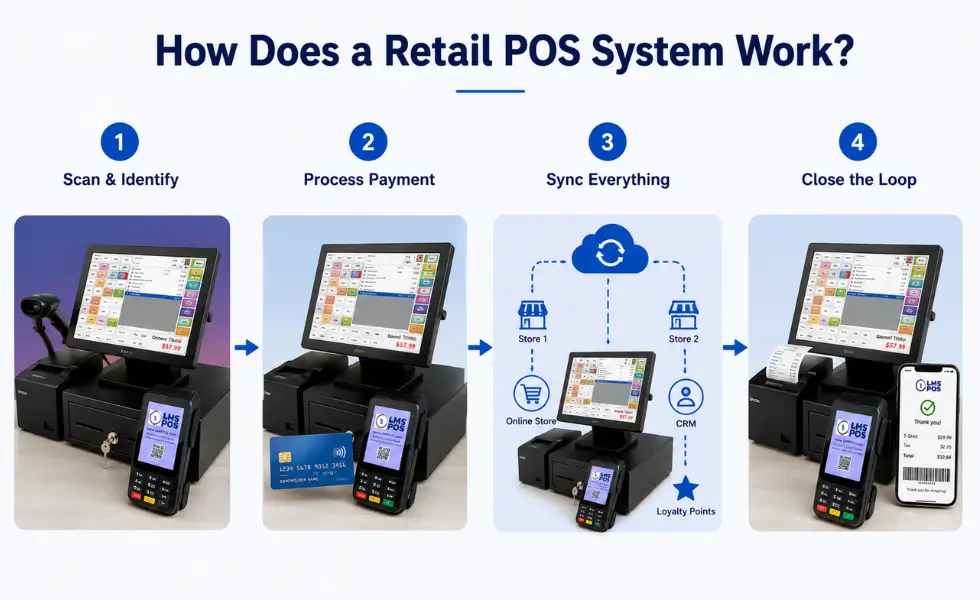
At checkout, a retail POS system scans the item, pulls live pricing and inventory data, processes payment through an encrypted channel, updates stock across every connected channel, and generates a receipt, all in a few seconds.
Every point of sale system for retail business transaction follows the same basic sequence, whether you are ringing up one item or fifty. This is really what is a retail POS system once you get past the definition and look at how it actually runs.
- Scan and identify the barcode, which pulls the SKU, price, and current stock level instantly.
- Process payment card, contactless, and mobile wallet payments run through EMV and tokenized end-to-end encrypted channels.
- Sync everything: inventory, CRM records, and loyalty points update in real time across every store and your online channel.
- Close the loop: a digital or printed receipt is issued, and returns or exchanges adjust inventory automatically.
Benefits of Using a Retail POS System
A retail POS system does much more than process payments. It helps you manage inventory, speed up checkout, improve customer service, and streamline daily operations from one centralized platform.
Whether you run a single store or multiple locations, the right POS system saves time, reduces errors, and supports business growth.
- Real-Time Inventory Management
- Faster Checkout Experience
- Omnichannel Selling
- Smarter Inventory Management and Forecasting
- Customer Loyalty and Relationship Management
- Simplified Employee Management
- Better Business Insights and Reporting
Want to experience these benefits in your own store? Contact LMS POS to see how it automates inventory, speeds up checkout, and keeps every sales channel connected.
Essential Hardware for a retail POS system setup
Software handles the logic, but you still need the right gear on the counter. Part of understanding what is a retail POS system is knowing the hardware that supports it, not just the software. Choosing the right gear matters as much as the software when you are setting up a POS system for a retail store.
Things to take note of whensetting up a POS system:
- POS terminal desktop, tablet, or mobile, depending on your counter space and mobility needs
- Barcode scanner and cash drawer wired or wireless, paired with automatic drawer release
- Receipt printer thermal printing for fast, reliable receipts, digital receipt option included
- EMV card reader chip, tap, Apple Pay, and Google Pay support built in
How to Choose the Best Retail POS System for Your Store?
Once you know what is a retail POS system, choosing the best one for your business means matching the software to how you actually operate, not just picking the most popular name.
There’s no single best retail POS system for every business; the right one depends on your store’s size, category, and growth plans.
Run through this checklist before you commit:
- Business size and number of locations
- Industry-specific needs (grocery, apparel, electronics, pharmacy, etc.)
- Inventory complexity
- Ecommerce integration requirements
- Payment processing options
- Offline functionality
- Hardware compatibility
- Customer support quality
- Total cost of ownership, not just sticker price
A POS system for retail store operations with one location has very different needs than a five-store apparel chain running BOPIS and online orders.
The checklist above is how you tell the difference before you sign a contract. That’s the real test of the best retail POS system: does it fit how you actually run your store, not just its feature list.
Why Choose LMS POS for Your Retail Business?
LMS POS is built as a cloud-first POS system for retail stores and multi-location operations alike.
You get real-time inventory sync, secure PCI-DSS-compliant payment processing, omnichannel selling, and detailed reporting from one dashboard plus local implementation support and staff training when you onboard.
Whether you need enterprise-grade multi-store tools or lean retail POS software for a small business setup, LMS POS scales to fit.
Final Thoughts
Running a successful retail business takes more than just processing sales. You need accurate inventory, smooth checkouts, clear reports, and a system that keeps everything connected.
By now, the answer to what is a retail POS system should be clear: it is the platform that keeps your store organized, saves you time, and lets you focus on your customers instead of manual tasks.
Whether you have one store or several locations, LMS POS makes it easier to manage your day to day operations from a single, cloud based platform.
Frequently Asked Questions
What is a retail POS system, in one sentence?
A POS retail system is a system that ties together sales, payments, inventory, and customer data, so running your store day-to-day is actually manageable.
What are retail POS systems used for beyond checkout?
There’s a lot happening behind the scenes that has nothing to do with taking payment. A good POS also keeps your inventory counts accurate, shows you what’s actually selling, lets you see how your staff are performing, powers loyalty programs, spits out reports when you need them, and keeps your online store and physical shop in sync.
How does a retail POS system work?
It’s pretty straightforward in practice: you scan the item, the system works out the total, the customer pays, the stock gets updated automatically, and the sale, along with whatever customer info is tied to it, gets logged. A receipt prints out, and the whole thing takes seconds.
Is a cloud-based retail POS system better than a traditional one?
Yes, a cloud-based retail POS system is better than a traditional one. You get to check on your store from anywhere; updates happen automatically instead of you having to install them; reporting is live rather than delayed; and scaling up as you grow is a lot less painful than with an old-school on-premise setup.
Can a retail POS system work without the internet?
Yes, a retail POS system can work without the internet, and this misconception causes more confusion than it should. LMS POS, along with most modern systems, will keep processing sales even if your connection drops. Once you’re back online, everything syncs up automatically, no manual fixing required.
Is a retail POS system suitable for small businesses?
Definitely. You don’t need to be running a chain of stores to benefit. Small business retail POS software gives you the same core tools for handling sales, stock, payments, and customers at a price that makes sense, and it can grow alongside you.

Dipesh Shrestha
Dipesh Shrestha is the co-founder of Compro Boston, the company behind LMS-POS. With over two decades of hands-on experience in point-of-sale (POS) deployment, payment processing ecosystems, and retail hardware logistics, he specializes in building secure, highly optimized checkout environments.